Mobile job gallery
Turning a technician’s camera roll into a job record that a homeowner, a crew lead and an insurance adjuster can all argue from
the problem
In roofing, the photograph is the deliverable that outlives the job. The shingles get covered by the next layer. The invoice gets paid and forgotten. The photo is what somebody looks at when deciding whether to pay for decking that nobody can see any more.
That makes a job photo an unusual design object. It is captured in the worst conditions any of our users work in — one hand, bright sun, a pitched surface, gloves — and it is read in the best: someone at a desk, months later, who was never on that roof and is looking for a reason to say no.
Zuper had the first half and none of the second. Photos attached to a job and then went quiet. Nobody could browse them, group them, mark what mattered on them, or send a set to a homeowner. A platform that cannot produce evidence quietly hands that job to whatever the crew already has — a personal camera roll and a group text — and at that point the record stops belonging to the company that is liable for it.
the constraint
Every capture happens one-handed, on a pitched roof, in direct sun, often with gloves on and one bar of signal — and the result has to still make sense to a stranger reading it six months later, in a dispute, who was never there.
the words, in plain English
- Adjuster — The insurer’s inspector. They decide what a claim pays, and they decide it largely from photographs.
- Supplement — A second claim filed when the crew finds damage the first estimate missed — rotten decking under the old shingles, say. It is approved or refused almost entirely on photos taken before the new roof covered the evidence.
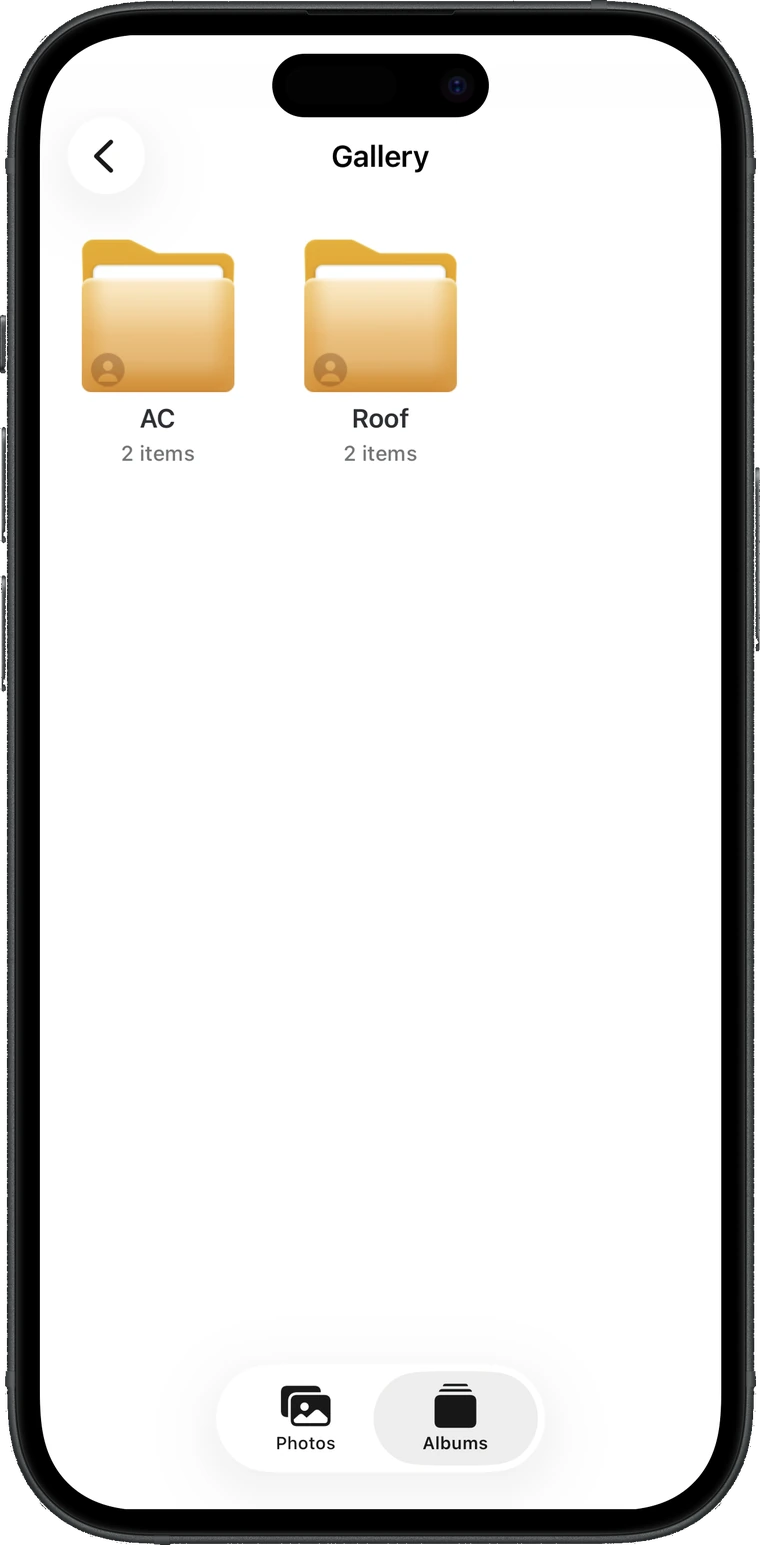
- Album — In this product, a named view of one job’s photos. Not a folder — the photo itself never moves.
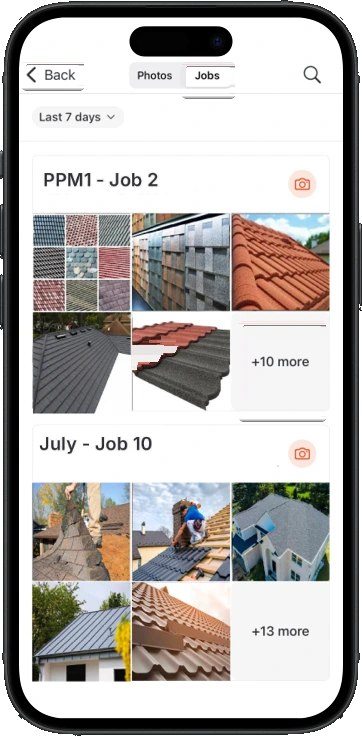
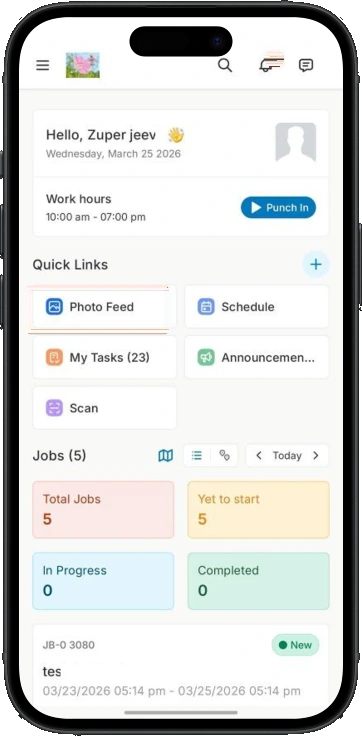
- Photo Feed — One screen showing every photo across every job, instead of one job at a time.
- Geo-tag — The coordinates the phone records alongside the photo — what makes it checkable that the picture was taken at that address.
how I understood it
I started inside the existing product rather than in a blank file. Photos already attached to jobs, so the question was never “should there be photos”. It was what happens to one after it is taken, and where that chain breaks.
Then I worked the chain backwards from its end. A photo in a roofing business is not taken to be looked at; it is taken to be produced later, by someone defending a number. So I mapped the moments where a photo gets produced — an initial claim, a supplement, a callback dispute, a final walkthrough with the homeowner — and asked what the photo has to carry to survive each one.
That reframing did most of the work. It turns “build a gallery” into “build a record”, and a record has requirements a gallery does not: it has to say who took it, when, at what address, and which part of the picture the person was pointing at.
what I found
A bare photo proves nothing
A picture of a roof is a picture of a roof. What makes it evidence is everything around it — who took it, when, at what address, and which part of it they meant. All of that is free to capture at the moment of the shot and nearly impossible to reconstruct afterwards.
The mark is often a number
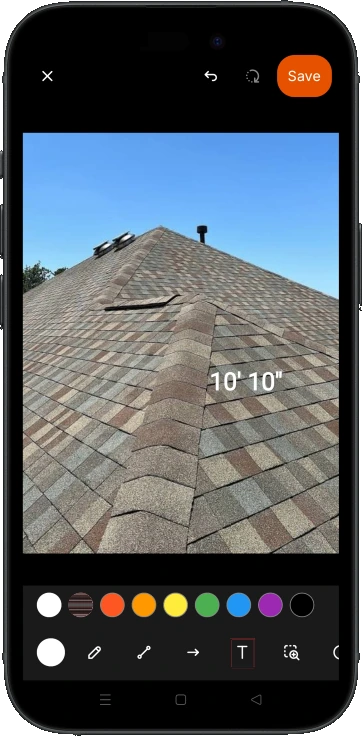
In roofing the useful annotation is rarely “look here”. It is “10 ft 10 in” along a ridge, or a square-foot figure on a slope — because those are what an estimate is built from and what a supplement is argued with. A markup tool that can only draw sends the technician somewhere else to write the number down, and the number was the part worth capturing.
Sorting happens at two different times
Some photos are taken for a known purpose — the before pictures, the damage shot the adjuster asked for — and could go straight where they belong. Others are taken because something looked wrong, and get sorted later at the truck. A design that supports only one of those pushes half the work back out of the app.
The audience does not have a login
The homeowner and the adjuster are the two people who most need to see the photos, and neither will ever have a Zuper account. Any answer that ends in “ask them to sign up” ends, in practice, as a text message with attachments.
The photo outlives the job
A roof gets argued about long after the job is closed and paid. If the evidence is only reachable while a job is open, the system is unavailable exactly when the stakes are highest.
the decision it all hangs on
Everything else followed from one question: when a technician puts a photo into an album, what happens to the photo?
It sounds like a database detail. It is the whole design. It decides whether bulk-selecting forty photos is a confident action or a nervous one, whether “remove” needs a warning, whether a photo can be in two places at once, and whether anybody trusts the feature enough to use it on a job that matters.
- The album owns the photo — adding moves it in, removing takes it out
Complexity lands on: the technician, who now has to be careful with evidence. Rejected. It turns every organising action into a small risk, and the person carrying that risk is holding a phone on a pitched roof with gloves on. Tidying should never be able to destroy the thing being tidied. - The album points at a photo that lives once, on the job — shipped
Complexity lands on: engineering, which absorbs the sync rules and the orphan cases. Shipped. Removing from an album clears an association and nothing else — the photo is still in the job gallery. A photo captured from inside an album syncs back to the job automatically. The complexity moves to the place best equipped to hold it. - No albums at all — tags and filters only
Complexity lands on: the technician, who has to remember the vocabulary. Rejected for this vertical. Roofing runs the same named stages on every job, so the structure is known in advance. Tags are the right tool when the categories are unknowable; folders are right when everyone already agrees what the folders are. Tags still exist here — they are just not the primary structure.
The album became a view. That single choice is why the interface can afford to be blunt: long-press to select, tap to add, trash to remove, no confirmation theatre and no warning copy — because there is nothing in this flow that can lose a photo. The riskiest-looking gesture in the feature is safe by construction rather than by caution.
the decisions underneath
Two doors into the same album
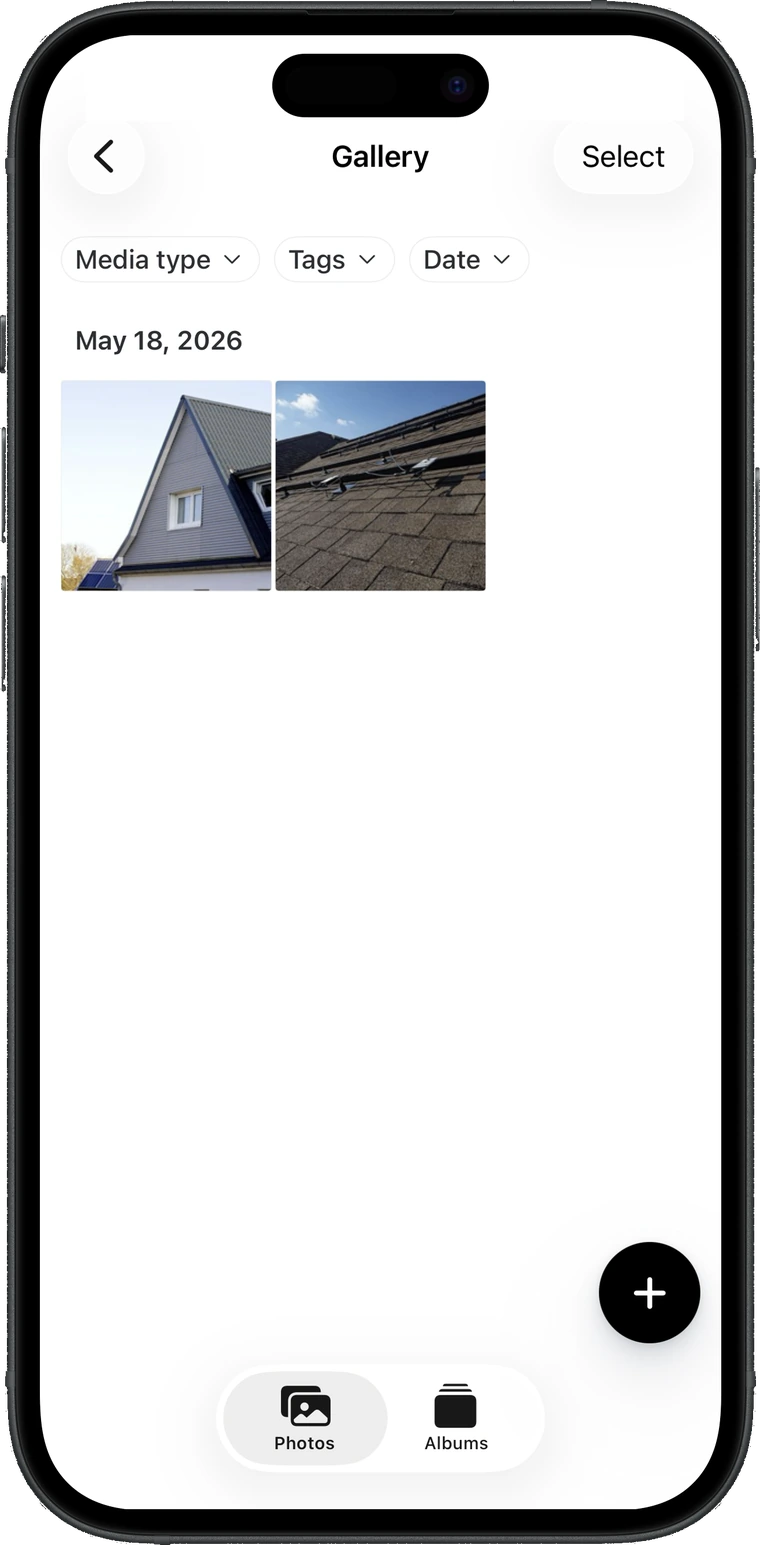
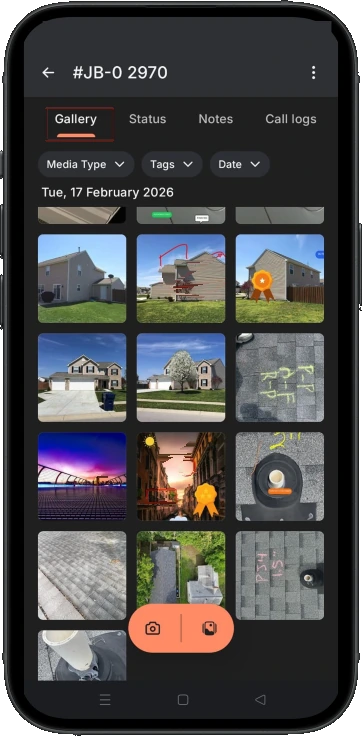
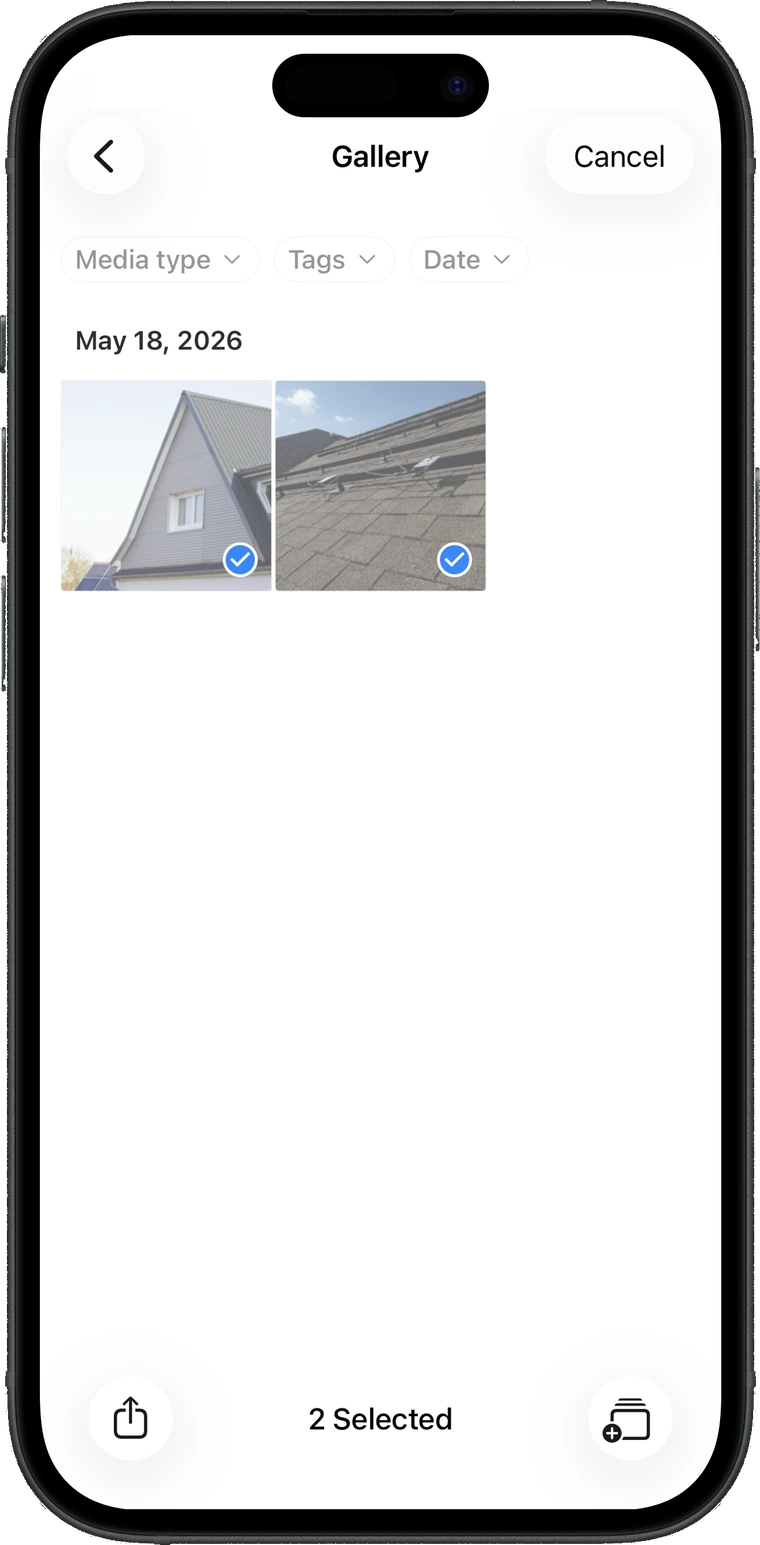
From the job gallery, long-press any photo to enter selection, pick the rest, and send the batch to an album. This is the end-of-day path: everything got shot, now it gets sorted.
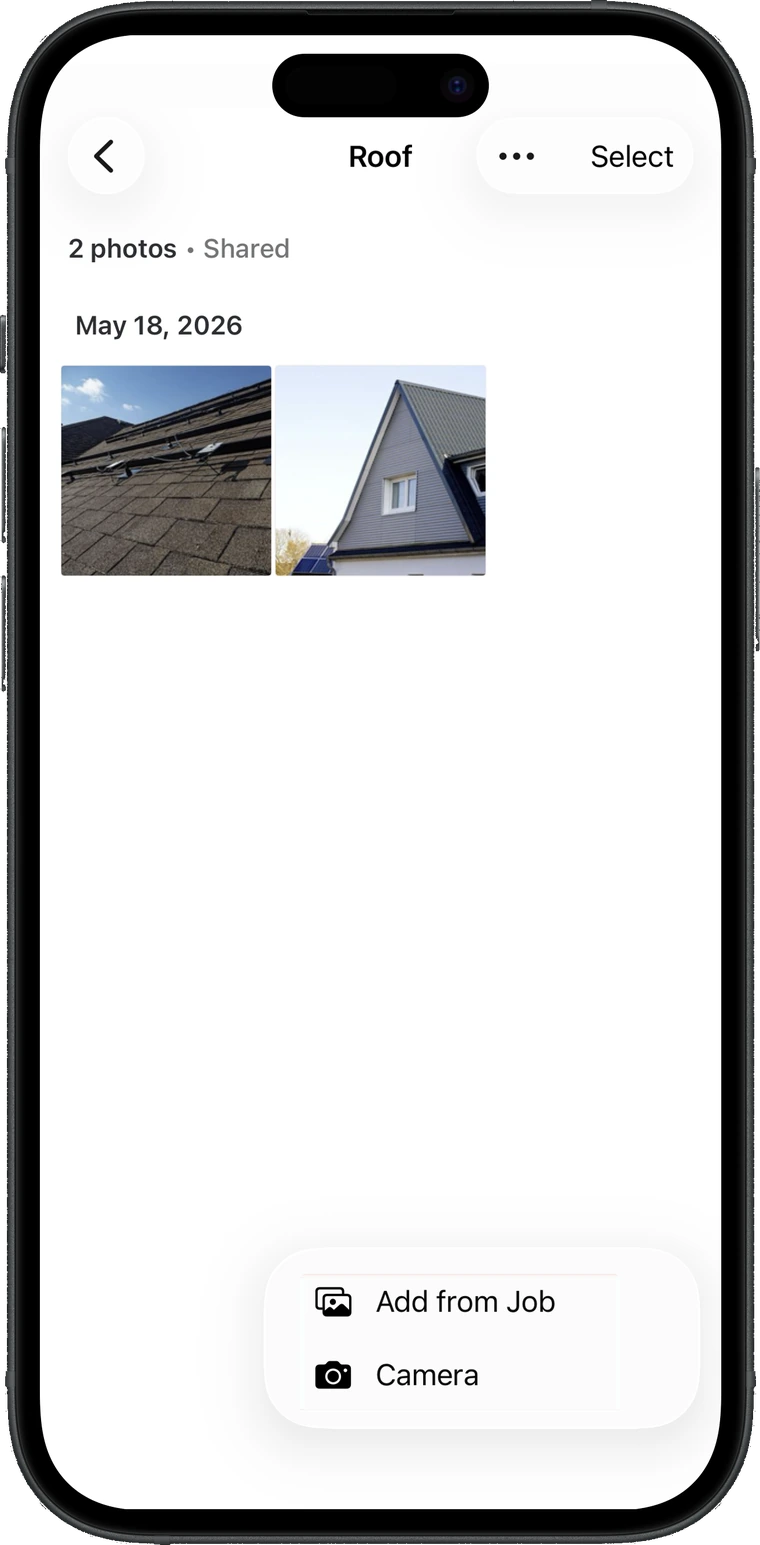
From inside an album, the (+) offers two things — pull from the photos already on the job, or open the camera and shoot directly into this album. This is the on-purpose path: I am about to take the before pictures, and I want them filed before I take them.
Both doors lead to the same room, and photos taken through the second one still appear in the job gallery. The technician never has to learn which model the software prefers, because it does not prefer one.
The record around the photo
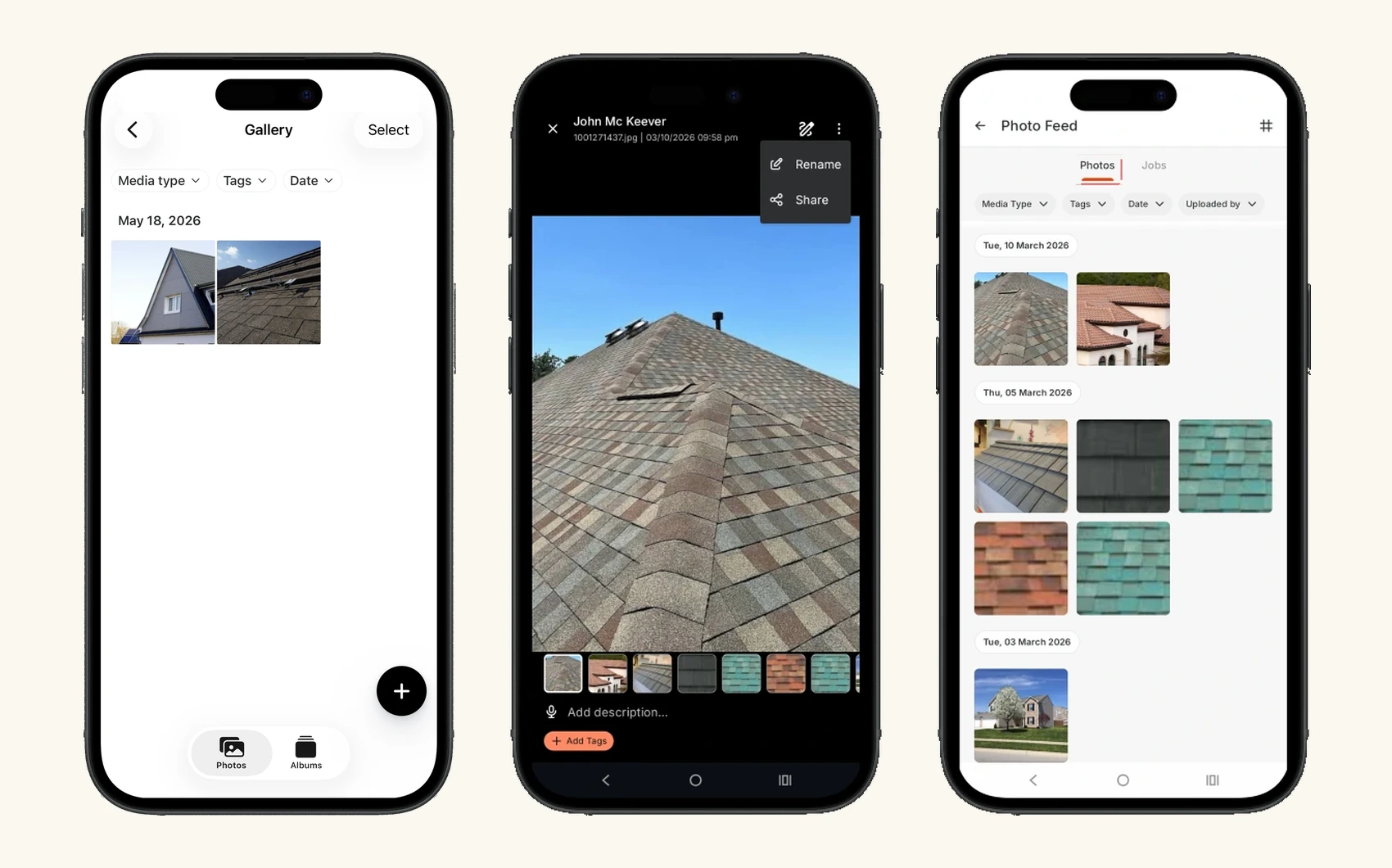
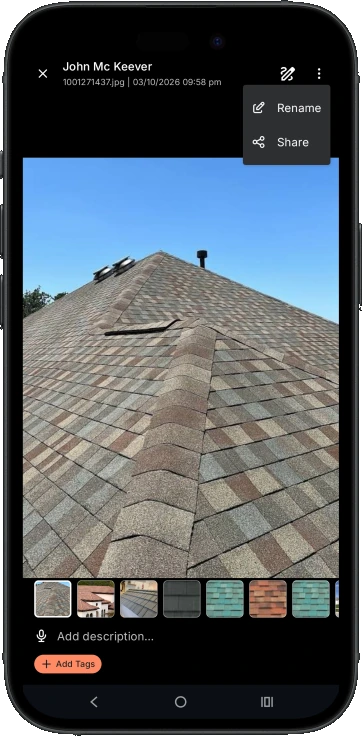
Opening a photo full screen puts who uploaded it, the file name, and the date and time above the image — not behind an info button. That header is the part an adjuster cares about, so it is the part that is always on screen.
Underneath sit the two things only the person who was there can add: a description and tags. The description takes voice input, because a technician on a roof with gloves on is not going to type a sentence, and a spoken note beats the empty string you get if you ask them to.
Annotation opens from this screen rather than from a separate editing mode. Marking the damage is part of describing it, and splitting them would make the mark an optional extra step — optional extra steps do not happen on a roof. What that marking had to be able to do is the next two decisions.
Marking damage in the units of the trade
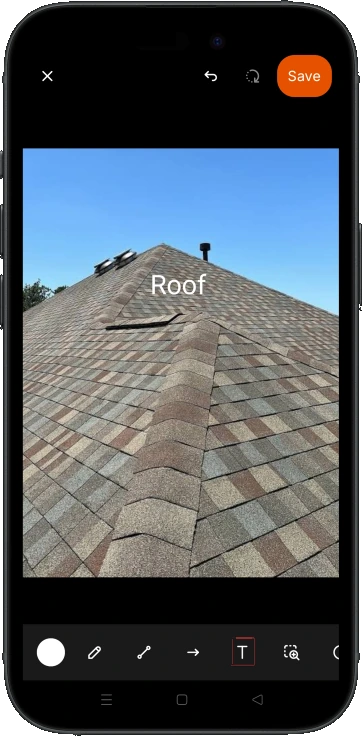
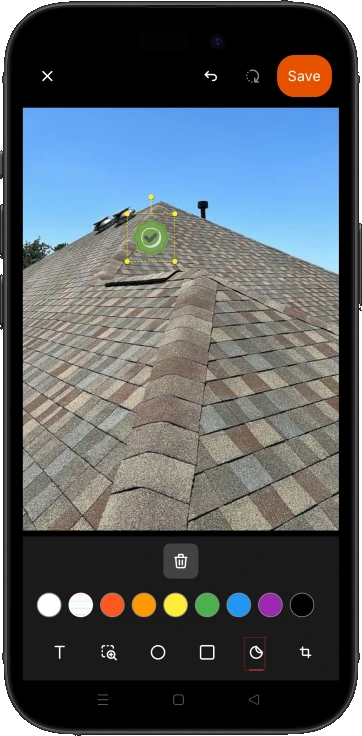
The toolbar is what you would expect: freehand, straight lines and arrows, circles and rectangles, a polyline for tracing an irregular edge, crop, and a fine rotation for the photo that came out crooked. That part is table stakes and it should look boring.
The part that is not table stakes sits inside the text tool. It switches between plain text and a measurement mode that takes feet and inches, metres and centimetres, or square feet, and writes the result onto the photo. A roofer does not want to annotate “big”. They want 10′ 10″ on the ridge, because that figure is going to be re-read by somebody pricing the job.
That one toggle is the difference between a generic image editor bolted onto a field app and a tool that belongs to this trade. A dimension written on a photo at the moment it was measured is the cheapest and most defensible number anyone on that job will ever get — nobody re-measures a roof from the ground three weeks later.
One tool is not on both platforms yet: the magnifier, for showing a nail pop at a size you can actually see, is Android only. That is a gap rather than a decision, and it is the kind that quietly leaves two crews on the same job producing different-looking evidence.
A sticker says the same thing every time
Freehand is expressive and inconsistent. Two technicians circling the same damage produce two records that do not look alike, and somebody reviewing fifty jobs cannot scan them.
So the toolbar also carries stickers — fixed marks, placed with a tap, resized and rotated, that mean the same thing on every photo in the company. The one line of guidance that ships with the feature is exactly that: standardise with stickers.
Both exist deliberately. Freehand is for the thing nobody anticipated; the sticker is for the thing that happens on every job. Forcing a technician to choose between expression and consistency would have produced neither.
One warning, in the whole feature
Everywhere else here there is no confirmation and no warning copy, because the album decision made loss impossible. Remove a photo from an album and the photo is still on the job.
Annotation is the single exception. Crop and rotate change the image, and unsaved marks are real work that exists nowhere else yet. So this is the one screen that asks whether to discard the changes or keep editing.
The point is not that the dialog is clever — it is that there is exactly one of them. Confirmations on every action teach people to dismiss confirmations, and then the one that mattered gets dismissed with the rest.
A link, not a login
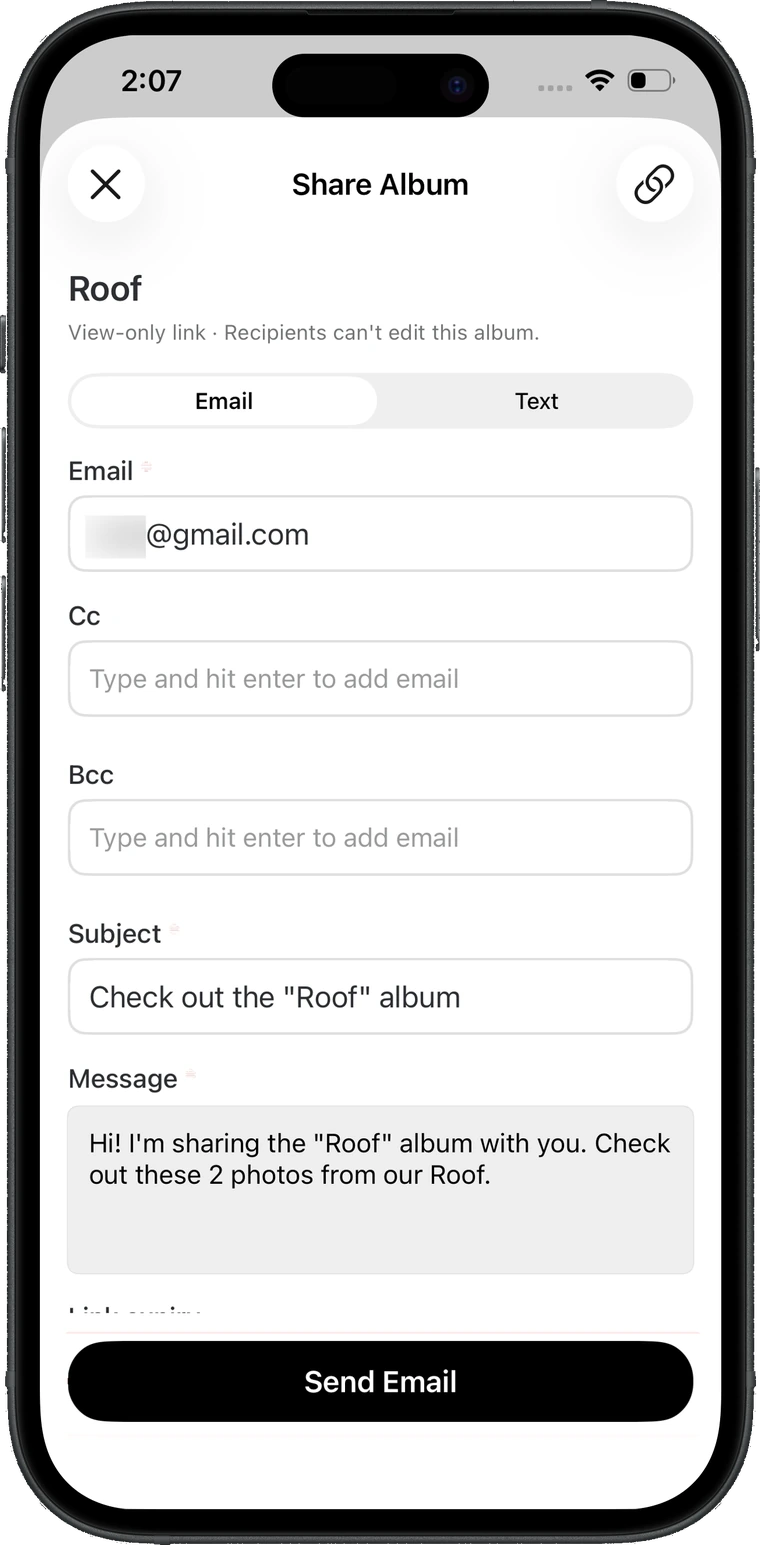
Sharing an album produces a view-only link, sent by email or text, with the recipient already filled in from the customer on the job. The screen states in plain words that recipients cannot edit the album, because the person tapping send is handing evidence to the other side of a negotiation and needs to know exactly what they just gave away.
The link carries an expiry chosen at send time — 7 days, 30, 90, or never. Expiry is the quiet part of this design. A permanent public URL to photographs of a customer’s property is a liability that arrives years later, and defaulting it to “forever” would have been the easy thing to do.
It cannot be changed after sending, and that is a real limitation worth naming rather than hiding. The recovery is to share a fresh link with a new expiry, which is a simpler thing to explain than a link-management screen nobody would ever open.
One feed above all the jobs
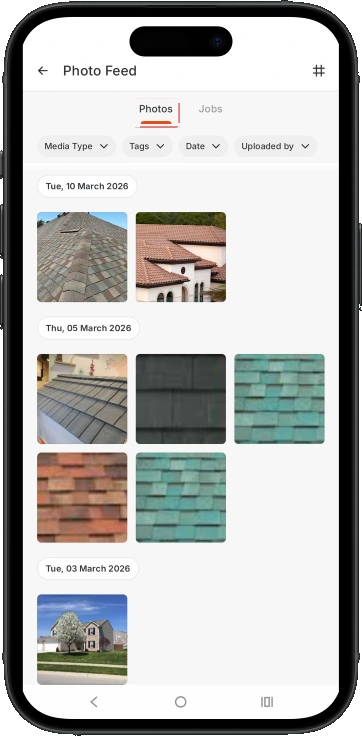
The job gallery answers “what happened on this job”. It cannot answer “what did my crew do this week”, “find me the shot tagged drone”, or “which of these jobs still has no before pictures” — and those are the questions a lead actually asks.
So the feed sits above the jobs, on the dashboard, with filters for media type, tags, date range and uploader, and two readings of the same set: a plain grid by date, or grouped into job cards. The grid is for hunting one photo; the cards are for reviewing coverage job by job. Same data, two questions.
Grid density is adjustable — three, four or six across. Scanning a hundred roof shots and inspecting one are different tasks, and a fixed grid quietly picks a side.
Albums that already exist
Roofing accounts ship with a set of default albums already created, matching the stages every roofing job runs through. Every other account type gets them created by an admin in settings.
This is the difference between a feature that gets used and one that gets described in a release note. An empty organising system asks a technician on a roof to invent a taxonomy. A pre-filled one asks them to tap a folder.
It also settles the empty state: the Albums tab does not appear at all until at least one album exists. A tab that leads to nothing teaches people the feature is broken, so there isn’t one.
Visibility follows the role
A technician sees their own uploads. A lead sees their team’s. An admin sees everything. The “uploaded by” filter only appears for the two roles who have more than one uploader to filter between.
The reasoning is that the same screen is a personal work surface for a technician and a review surface for a lead, and those want opposite defaults. Showing a technician every photo in the company would bury their own morning’s work under a stranger’s.
The cost is real and I will not dress it up: two technicians documenting the same roof together cannot see each other’s photos from the feed. For a two-person crew that is the wrong answer, and it is the first thing I would take back to usage data.
what shipped
- A gallery on every job — photos and albums, filters by media type, tag and date, and a full-screen viewer that swipes through the set and zooms.
- Albums as non-destructive views, available on active and completed jobs, filled either by bulk selection or by shooting straight into one.
- An annotation canvas on the photo — freehand, arrows, shapes, polyline, stickers, crop and rotate, undo and redo, and a text tool that switches into feet and inches, metres, or square feet.
- A description with voice input and tags on every photo, both of them filterable from the feed.
- View-only share links by email or text, prefilled from the customer on the job, each with a chosen expiry.
- A Photo Feed across every job — filtered by type, tag, date and uploader, readable as a grid or as job cards, scoped by role.
the screens
what changed
- 0→1capture, organise, mark up and share — none of it existed
- 4 surfacesjob gallery, albums, an annotation canvas, a cross-job feed
- Roofing-firstdefault albums, and measurements in the units of the trade
what I'd do differently
The build was a gallery; the problem was a record. Once I started asking what a photo has to carry to survive an insurance adjuster rather than what a grid should look like, most of the interface decisions stopped being opinions. The one I would revisit is visibility — a technician cannot see their own crewmate’s photos on a shared job, and I want usage data on how often that bites.
Open the full portfolio →