Live calls told us what to look for. Searching the recorded ones told us
how often it came up.
Check 02 · product data
Checked whether the behaviour already existed in the data.
Are people already attaching files to jobs?
yes — problem is real
Which job fields get edited most after creation?
ordered the fields
Is anyone using the rich-text surfaces we already have?
cut an editor
PostHogThe first one confirmed people were already doing this the hard way. The
last one meant we reused the existing block editor instead of building a second.
Check 03 · the community
Asked in the NoQuit community, where we're not in the room.
They were already paying a separate e-signature subscription for the last step of a job that
lived in Zuper.
How we treated it
Communities over-represent the confident and the annoyed. So anything we found
there had to also show up in a call or in the data before it counted.
It's also where the vocabulary came from. They say
paperwork, not documents. That word ended up in the UI.
Check 04 · competitors
Two mature categories, and nobody in the middle.
Their own contract, unchanged, filled in by our job record.
Document tools are powerful and know nothing about the
job. Field-service platforms know everything about the job and treat paperwork as an
attachment you drag in.
Four checks, same answer
Real problem, and they were already paying someone else to solve it.
only now did we start designing
Modelling 01 · the constraint
This had to go inside a Jobs module that already existed.
already there
The job record
Customer & property data
The job's photo gallery
Proposal block editor
Settings, per module
what we had to add
Reusable document templates
Fields and signatures on a page
Job data pulled in automatically
Send, sign, track
not negotiable
No new navigation
No second editor
Existing components only
Documents belong to a job
A new module would have been easier to design and wrong — the paperwork
only makes sense attached to the job it came from.
Modelling 02 · the options
Four ways to model who can change what.
Model
Result
Why
Templates locked, no job-level edits
rejected
Safe and unusable. Every job needs something changed, so they go back to the PDF editor.
Anyone can edit anything on a job
rejected
A salesperson can delete a liability clause by accident and the document still looks fine.
Our services team builds each document
rejected
Doesn't scale. Their paperwork changes faster than our tickets close.
Template author locks it, page by page
shipped
The person who knows why a clause exists is the one who protects it. The job gets a copy it can adapt but not damage.
Modelling 03 · validation
Took the model back out before drawing a single screen.
01
Customers
Walked them through it in words. Does “you lock the pages, your salesperson fills in the
rest” match how you'd actually work?
02
Subject matter experts
Our own implementation and support people, who set these things up for customers every
week and know where it breaks.
03
Engineering
Is a per-page lock and a copy-on-apply model actually buildable in the Jobs module as it
stands?
Validating a model is cheaper than validating a screen. If the model is
wrong, no amount of interface fixes it.
Handover 01
The PM roughed it out in Stitch. That was the brief.
“Job Template Type Update” — a template list, a create-document modal, and a logic flow.
Rough on purpose. It fixed the scope, not the design.
It named the screens he expected to exist and left how
they work to me — the right level to hand over at.
It also carried one hard constraint: the
Module field pre-filled with “Jobs”, locked, labelled RESTRICTED V1. Documents belong to
a job in v1 and nowhere else.
Execution 01
I took it from there. Structure first, screens second.
01
Where templates live, and where copies live
Masters in Settings, per-job copies on the job. Edits never travel back.
What a page is
Three kinds — written, uploaded PDF, or pulled from the job's gallery — mixed in one document.
What a lock applies to
A page. Not a role, not a user. The thing that must not change is a paragraph.
Where job data enters
Variables placed once in the template, resolved when the document is generated.
What the statuses allow
Draft, sent, awaiting, partially signed, signed, void, expired — each with different available actions.
Execution 02
With the structure settled, building it took under a day.
design system
Our tokens and components, already in code
No Figma round-trip on this one. The system I maintain was the starting point.
Claude Code
A working builder, not a mockup
Block editor, PDF upload, draggable fields on real coordinates.
Vercel
Deployed on a link, same day
Anyone could open it and click — engineering, SMEs, the PM, customers.
The build was fast because the research was already done — and because
the design system already existed.
Execution 03 · constraints and negotiations
Where the PM and I pulled in different directions.
The tension
Where it landed
Why
How much ships in v1
Split into phases
Engineering bandwidth was the real limit. We cut by phase rather than shipping all of it thinly.
Rich text on written pages
Worked inside TinyMCE
The editor we already run couldn't do everything we wanted. The design bent to it rather than blocking the release.
New builder or reuse ours
Repurposed the existing one
The proposal builder already did pages and blocks. Reusing it meant one experience to learn and one to maintain.
Two of these three are constraints, not compromises — and saying which
is which is most of the job.
Execution 03
Built three variations and put each through three reviews.
A
Builder as a full page
B
Builder in a side panel on the job
C
Page list plus canvas, like the proposal builder
Cheap to produce, because they were
variations on a settled model rather than three different ideas.
Subject matter experts
Does it match how customers actually set this up?
Engineering
Is it feasible in the Jobs module in this cycle?
PM
Is it the scope we agreed, and can we ship it?
Execution 04
Final approach back to the customer before we shipped.
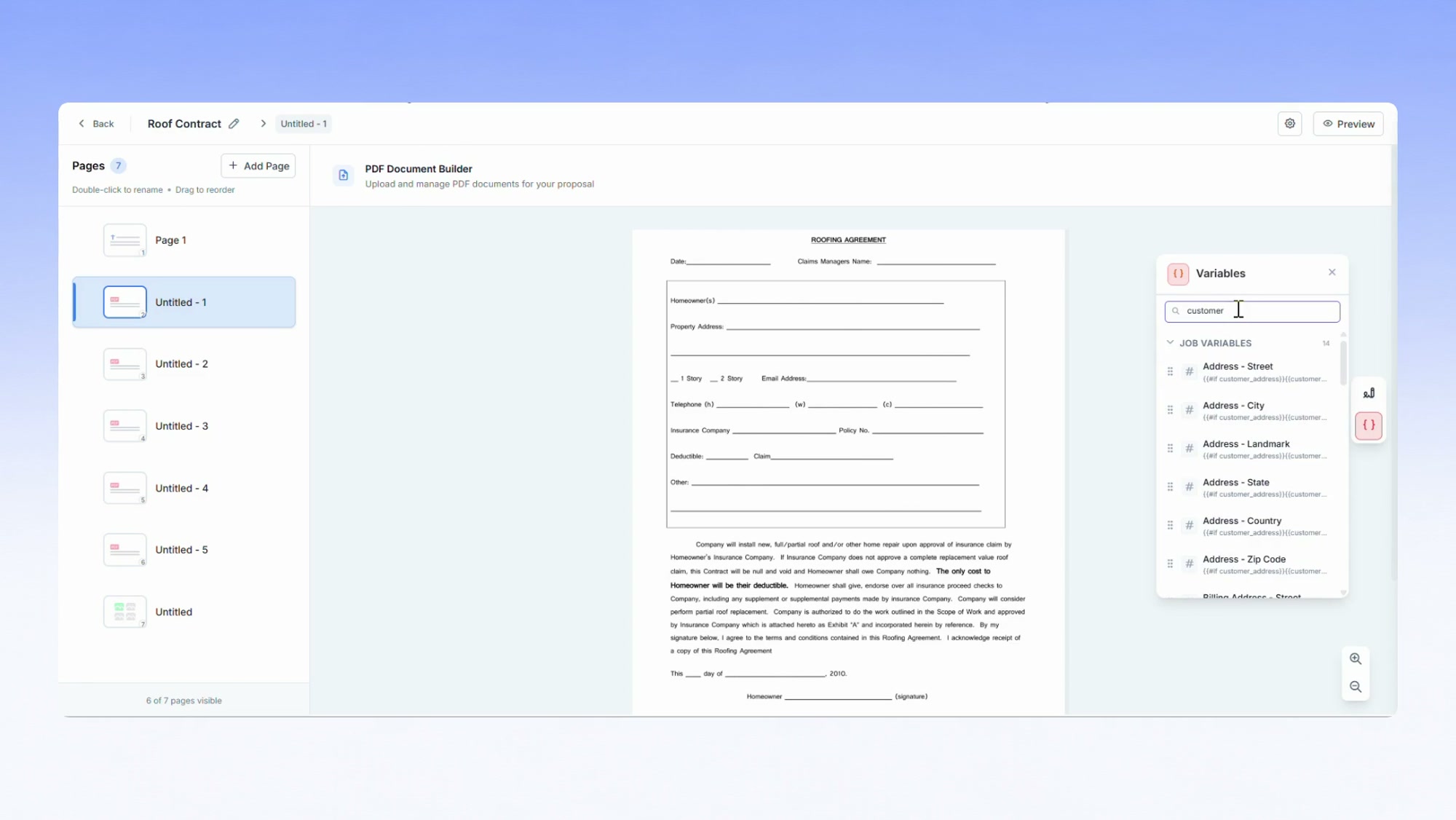
An uploaded contract, unchanged, with our fields over it. The panel on the right is
the job filling itself in.
They clicked the deployed prototype rather than looking
at a picture, so the feedback was about behaviour — what happens if I edit after sending,
who signs first, what if my PDF is a scan.
Those questions are much cheaper to
answer before release than after.
Shipping 01 · four gates
Four gates between “it works on my machine” and released.
01
Design × Dev audit
I go through the build with the developer. Every state — default, hover, focus, loading, empty, error — and every edge case we can name.
02
Dev × Implementation audit
Engineering checks the implementation against the spec. What the lifecycle actually allows, not what it looks like.
03
Staging
Internal people get to break it, and QA starts their pass on a real environment.
04
QA pass, then release
We don't ship on a design sign-off. We ship on a QA pass.
Shipping 02 · released
Released, then went back to the data and the customers.
what shipped
Templates built once, applied to any job
Existing PDFs kept intact, fields laid over them
Job data filled in automatically
Customer and internal signer, tracked
Signed copy on the job, with an audit trail
then we checked
PostHog
Back to the same data we used to justify it. Are
documents actually being created per job, and are they reaching signed rather than
sitting in draft?
Then back to the customers who'd helped
us shape it, to hear what the first real contracts through it felt like.
The whole thing
Most of the week went into being sure. The build was the short part.
research & validation
Confirming the problem was real
Customer calls with the PM, Fathom across the recorded ones, PostHog, the NoQuit
community, competitors. Four checks, same answer.
modelling
Deciding who can change what
Four models, one shipped — validated with customers, SMEs and engineering before
any screen existed.
build, review, ship
Under a day to build
Existing tokens and components plus Claude Code, three variations, three reviews,
back to the customer, out.
The build was fast because the research was slow. Not instead of it.
What's next
Where AI goes in the builder, and where it doesn't.
01
Read an uploaded PDF and propose the fields
Today someone drags every field onto a contract by hand. The blanks are findable — a
model can propose them and the author confirms.
02
Suggest which job field fills which blank
We already know the job's customer, address and price. Mapping them to a blank is a
suggestion problem, and the author still approves it.
03
Flag what changed from the master
Before a document goes out, show what's been edited away from the locked template.
Catches the silent failure we designed around.
All three are suggestions a human confirms. Nothing auto-sends a legal
document, and nothing edits a locked page.
 “contract” “waiver” “signature” “docusign” “paperwork”
 PostHog
The first one confirmed people were already doing this the hard way. The
last one meant we reused the existing block editor instead of building a second.
PostHog
The first one confirmed people were already doing this the hard way. The
last one meant we reused the existing block editor instead of building a second.
 Claude Code
 Vercel